

What Triggers an Unknown Publisher Warning?
Upon downloading and running an executable on Windows, the operating system checks whether the file has a valid digital signature issued by a trusted Certificate Authority (CA). If it does not, or if the publisher hasn’t yet established its reputation, Windows will intervene before the software runs.
In practice, there are two distinct systems responsible for these warnings.
Windows SmartScreen Alerts
Microsoft SmartScreen is a reputation-based filter built into both Windows and the Microsoft Edge browser. SmartScreen works by evaluating downloaded executables against a database of known software and publishers. Upon encountering a file that has no prior reference or for which there’s little download history available, users get a straightforward warning:
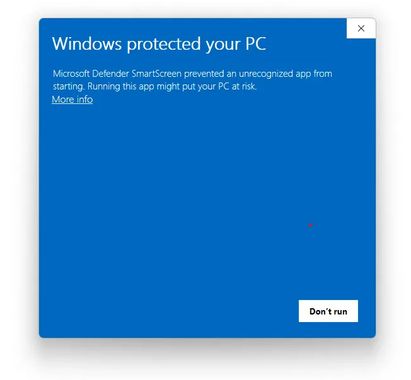
Users need to go out of their way to click the ‘Run anyway’ option for the code to execute, which is recommended only if they’re absolutely certain the software is safe. In most instances, SmartScreen warnings will warn users against running the executable.
SmartScreen reputation accumulates over time, which is particularly notable for new owners of IV and OV certification. In these cases, warnings will typically reduce in number as incident-free downloads and executions accumulate. Notably, EV certificates can help speed up this process by enabling rigorous identity verification. As a result, Microsoft grants faster SmartScreen reputation to EV-signed software without requiring the signer to establish its reputation over a long period.
UAC Signer Alerts
The User Account Control (UAC) dialogue screen appears when software requests elevated Windows OS privileges, and it’s separate from SmartScreen. Instead of outright blocking code execution, UAC warnings ask the user to confirm if they want to allow the application to make changes to their device.
UAC dialogue appears in two different variants:
Signed software UAC dialogue displays the publisher’s verified name with a blue header, which indicates a known identity.
Unsigned software UAC dialogue displays an Unknown Publisher warning with a yellow header, indicating that the OS cannot verify the publisher's identity.
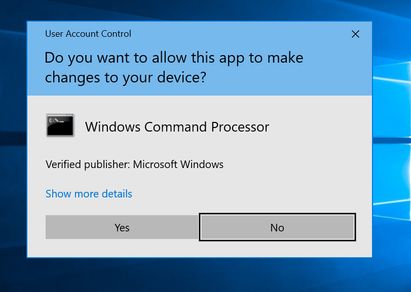
UAC prompts appear whether software is signed or not, but they are a step below SmartScreen’s ‘Unknown Publisher’ warnings, which in turn change how a user might respond to it.
MacOS Gatekeeper
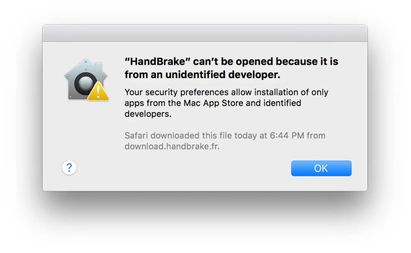
Apple’s MacOS equivalent is the Gatekeeper service. Gatekeeper users Apple’s notarisation service to reference downloaded applications, and software that’s not been notarised by using a valid Apple Developer ID certificate is blocked by default.
Notarising software for macOS execution involves submitting the signed binary to Apple for malware scanning, and failing to do so results in users receiving a warning that the application cannot run because the developer could not be verified.
To Summarize
Unknown publisher warnings exist as a way for operating systems to communicate the identities of code publishers to end users. A valid code signing certificate gives end-users a verified name to go off of, which directly affects whether users trust and execute the software in question.